Why this article#
I spent more than twenty years developing and architecting software. Over those years, I watched the same scenario repeat itself: a technology company decides, alone and unilaterally, to abandon a technology, break compatibility, change a price or a licence — and users, freelancers, associations, whole companies find themselves left high and dry. Not by accident, but because the very model of proprietary software allows it.
A word on vocabulary. In English we speak of “proprietary” software — a fairly neutral term that describes who owns the code. Richard Stallman and the French-speaking free-software community prefer the coined word privateur (“depriving”) over the neutral propriétaire (“proprietary”): it does not name a different kind of software, but the same software from another angle. Where “proprietary” speaks of ownership, privateur names the effect on the user — this kind of software deprives the user of their freedoms: the freedom to study the program, to modify it, to fix it, to keep it alive when its vendor has decided to let it die. It is not, then, a mere affectation, and it captures exactly what this article is about. With proprietary software, as Stallman explains, it is not the user who controls the program: it is the program that controls the user, and it is the vendor who controls the program. (See the definition of free software and “Free Software Is Even More Important Now”.)
This article rests on real situations: for the most part, walls I ran into personally; for the rest, cases I saw hit people close to me, or that were reported to me by other professionals in my field — and I flag it as I go. It then shows what free software would have changed, and opens a series, still being written, on free software and licences. I am not telling a theory. I checked the facts and dates against public sources, listed at the end of the article; where a memory could not be precisely confirmed, I say so.
Experience 1 — The music school and Microsoft Access#
In the late 1990s, the director of a music school develops, on his own time, a piece of software to manage his establishment. He builds it on Microsoft Access 2.0 (April 1994), a tool designed for non-developers: people with no software-engineering culture — no unit tests, no end-to-end tests — and for whom, in any case, the frameworks that make such practices possible did not exist in that environment at the time. Nights and weekends of work to make the school’s administration reliable and simpler, and to save everyone time.
Then comes the next version, Access 95 (August 1995). And there, the break. Between Access 2.0 and Access 95, compatibility is broken deep down:
- the internal language changes completely: Access 2.0 used Access Basic, replaced by VBA (Visual Basic for Applications) as of Access 95;
- there is a move from 16-bit to 32-bit: all system API calls have to be rewritten;
- new naming rules forbid what used to be allowed (a module and a procedure can no longer share the same name);
- the database engine itself changes (Jet 2.0 → Jet 3.0).
A small correction to my own recollection: I placed the break at Access 97 (January 1997), but it was actually Access 95, the version immediately following 2.0, that broke compatibility. The later versions merely piled on: Access 97, for instance, introduces new reserved keywords (AddressOf, Enum, Event, Implements…) that in turn break code using them as names. The result is the same: to move the Access 2.0 application to modern versions, you had to convert the file and then rewrite and retest a good part of the code, with no reliable automatic translator or migration guide worthy of the name.
To me, Microsoft simply abandoned those customers. People who had bought Access 2.0 and invested their personal time to improve their organisation. And even if the code had been perfectly “translated,” you would have had to retest everything — a prohibitive cost for a small outfit with no development team and no automated safety net. In the early 2000s, I myself tried to recover this code and migrate it to a recent version of Access. I ran into the same wall.
On the real difficulties of converting from Access 2.0, see Allen Browne’s page, “Issues in converting from Access 2”, and the Microsoft documentation on importing Access 2.0 and 95 databases.
Experience 2 — Homelidays and the millions of lines of Classic ASP#
In 2009, I join Homelidays as an architect. The site is built on Classic ASP: several million lines of code. Yet Classic ASP is already an end-of-life technology: its last stable version dates from 2000, and Microsoft had released its successor, ASP.NET, in 2002. The code keeps running, but the technology is dead: no more evolution, no future.
The problem is that with such a mass of code, migrating to VB.NET or C# represents a colossal investment. Rewriting everything at once is impossible. With the CTO of the time, we launch a gradual migration to C#: all new development is done in C#, and Classic ASP is frozen into maintenance-only mode. Around 2014 (from memory), about two million lines of Classic ASP were still in production. It was from this period that a component I published as open source was born — at the time on CodePlex, today on my GitHub: the Homelidays Session Service, to let sessions coexist between the old ASP world and the new .NET world.
And it is precisely at that moment that Microsoft tells us ASP.NET Web Forms — the technology toward which part of the migration path led — will no longer really be developed, in favour of ASP.NET MVC (released in 2009). As with Classic ASP: the code still runs, but the investment stops. Later, ASP.NET Core (2016) would drop Web Forms outright. Once again, a unilateral vendor decision that threatened to leave us high and dry.
This time, though, we escaped it — but not thanks to a choice that was ours to make: Homelidays had been acquired by HomeAway, which set about migrating the site to the group’s technology stack, based on Java. In other words, it was a corporate decision — and not the longevity of Microsoft’s technology — that got us out of the dead end. Without that acquisition and that migration, we would indeed have been left high and dry. Not everyone has the luck of being backed by a group able to finance such a shift.
Experience 3 — Visual Studio and the deleted MSI installer projects#
For years, Visual Studio offered a dedicated project type — the Setup and Deployment Projects (.vdproj files) — that made it easy to generate an MSI installer (Windows Installer) for your applications: choice of files to deploy, shortcuts, registry keys, custom actions… It was a feature built into Visual Studio, and therefore already included in the licence you paid for (in my case, through my employer’s MSDN subscription), and widely used.
Then, with Visual Studio 2012, Microsoft simply removed this project type. Visual Studio 2010 would be the last version to include it natively. In its place, Microsoft pointed users to InstallShield Limited Edition, a crippled third-party product (Flexera): no x64 support, no Windows service installation, no custom actions, no VSTO support… and designed, as its name suggests, to push you toward buying the full version. Overnight, an installer project that worked could no longer be maintained in the new version of the tool without rewriting it with a third-party solution, paid or limited.
The community’s reaction was massive. On UserVoice — the platform where Microsoft then gathered feedback on Visual Studio — the request to restore this project type became the second most-voted suggestion of the entire Visual Studio forum. And for years, Microsoft took no notice: VS 2012 and then VS 2013 shipped without native support.
Honesty demands it: the story does not stop there. Microsoft eventually gave in. In April 2014 (final version in June 2014), it released a Visual Studio Installer Projects extension that brings the feature back — an extension that, incidentally, still exists today (up to Visual Studio 2022). So the feature did come back — but only four years after VS 2010, a stretch during which everyone who needed it had to cobble together workarounds.
I myself only learned of this reversal while documenting this article: at the time, I was working at HomeAway and we were migrating to the group’s Java stack (see the previous experience), so I had left that world and never knew Microsoft had eventually restored the feature. That the best-ranked request — no. 2 — on an official feedback platform took four years to be (partially) heard says a great deal about the balance of power: even very numerous and very visible, users have no real hold on the vendor’s decisions.
Sources: Visual Studio Blog, “Visual Studio Installer Projects Extension” · InfoQ, “Visual Studio 2013 Installer Project”.
Experience 4 — The consignment shop and the Windows licence#
A few years ago, my wife sets up a consignment shop, La Petite Fouine (link to a 2018 archive snapshot). I develop a management application for her as a web app, in ASP.NET MVC / Entity Framework 6 / .NET Framework 4.6. To host it, I rent a small server from Dedibox for around ten euros a month (from memory, €10 to €15).
Then one day, with nothing changing technically — same server, same version of Windows — the bill jumps to about €45 a month. The reason: Microsoft unilaterally changed the licensing terms of Windows Server, and the host, which passes on the cost of the licence, is forced to charge much more.
The physical server still costs the same. It is only the proprietary system’s licence that explodes. For a consignment shop that doesn’t even bring in a minimum wage, €30 more a month matters enormously. Here again, depending on non-free software means depending on the vendor’s goodwill — with no hold on its decision.
Experience 5 — Windows 7 then Windows 10: imposed waste#
On 14 January 2020, Microsoft ends support for Windows 7. At that point, the OS is still massively used: estimates speak of around 200 million PCs still running Windows 7 at the end of 2019 (my memory said 250 million; the sourced figure is rather on the order of 200 million, which is still enormous).
The Free Software Foundation then launches the “Upcycle Windows 7” campaign: it asks Microsoft to release the source code of Windows 7 so that a community could maintain it, and thus avoid throwing millions of still perfectly functional computers into the bin. The petition, which aimed for 7,777 signatures, far exceeds its target (more than 13,600 signatories to date). Microsoft gives no response.
The story repeats itself with Windows 10, whose support ends on 14 October 2025 — when, at that date, the installed base is still gigantic. And this time, the ecological problem is worse: an estimated 400 million PCs cannot migrate to Windows 11 for lack of compatible hardware (the TPM 2.0 chip requirement, in particular). Microsoft does offer extended security updates (ESU), but paid ones (on the order of $30/year for individuals).
The result is twofold: a considerable ecological waste (hundreds of millions of machines pushed toward the skip or toward forced obsolescence) and a disregard for users, who are made to follow a timetable they did not choose. With a free system, a community could have extended the security of these machines for as long as it wished. With a proprietary system, it is forbidden: no one but the vendor has the right to touch the code.
I am not talking here about an abstract drama: in my own family, several still perfectly usable computers were rendered obsolete by these end-of-support dates.
Experience 6 — Windows Phone: a new phone with every generation#
This example I did not live through as a developer, but as an observer — it struck me because it shifts the mechanics of proprietary software from the computer to an object we keep permanently in our pocket.
Microsoft’s mobile line imposed two successive hardware breaks within two years, each time with no upgrade path:
- Windows Mobile 6.x (2007) → Windows Phone 7 (2010). Windows Phone 7 is an entirely new platform (Silverlight, XNA, .NET) accompanied by strict hardware requirements. In March 2010, Microsoft confirms that Windows Mobile 6.x devices will not be updated to Windows Phone 7, and that the applications of the old world do not run on it.
- Windows Phone 7 (2010) → Windows Phone 8 (2012). Same again: Windows Phone 8 switches to the Windows NT kernel and targets multicore devices. Windows Phone 7 phones cannot be upgraded to Windows Phone 8. Microsoft offers them only Windows Phone 7.8 (December 2012), an essentially cosmetic update that backports the new home screen — but not the system.
In other words, a user who simply wanted to stay up to date had, in two years, to change phones twice — not because the device was broken or worn out, but because its hardware had been declared incompatible. And this is the point that strikes me most: a phone made obsolete by software after two or three years is not a phone at the end of its life. The electronics, for their part, are far from unusable; what stops is the vendor’s willingness to support them. With a proprietary system, no one else has the right to extend the device’s life. It is exactly the mechanics of the previous experience (Windows 7 and 10), but on an everyday object.
Let us be fair: this failing was not peculiar to Microsoft. For a long time, short software support was the norm across much of the Android world (often two to three years of major upgrades), while Apple stood out for markedly longer support — on the order of five to seven years in practice, with security fixes beyond that (the iPhone 5S, released in 2013, was still getting a security fix in 2026). In fairness, one nuance is in order: Apple never formally “promised” a number of years; it is an after-the-fact observation, not an announced commitment.
The good news is that the situation has improved markedly — and it would be dishonest to pass over it in silence:
- since 2023, Google guarantees seven years of updates (system and security) on its Pixels, starting with the Pixel 8;
- Samsung followed in early 2024 by committing to seven years for the Galaxy S24;
- and since 20 June 2025, the European Union imposes a floor: the ecodesign regulation (EU) 2023/1670 requires at least five years of system and security updates after a model is withdrawn from sale, as well as the availability of spare parts for at least seven years.
An open question remains, which I raise without claiming to settle it: is seven years really enough? It is a considerable step forward compared with the two or three years of the Windows Phone era. But when hardware can last far longer, the gap between the physical lifespan of the device and the software lifespan granted to it remains the crux of the problem. And the decisive difference stays the same as in all the other stories: with a proprietary system, that duration depends on the timetable of a single vendor; with a free system, a community can extend support for as long as it wishes — which is precisely what projects like LineageOS or /e/OS do, giving years of life back to phones abandoned by their manufacturers.
Sources: TechCrunch, “Microsoft: No, WinMo 6.5 devices will not be upgraded to Windows Phone 7” · PCWorld, “Windows Phone 7 Users Can’t Upgrade to WP8” · Engadget, “Samsung pledges seven years of updates for S24 series” · European Commission, “New EU rules for durable, energy-efficient and repairable smartphones” (regulation (EU) 2023/1670).
Experience 7 — OneDrive and our family photos#
One evening, in 2024, I glance at my wife’s computer and see something worrying: all our photos stored on OneDrive are disappearing locally from her machine. 400 GiB of family photos vanishing from the disk — not from OneDrive, just the local copy. Once the operation is finished, in place of the photo folder there remains only a .url shortcut: clicking it opens a web browser. Same thing for the folder that held the KeePass database I share with my wife.
We each had a Microsoft 365 Family subscription with 1 TiB of storage, and neither of us had reached our quota. A folder I shared with her, which had been syncing locally for years, stopped being available offline overnight — breaking our family organisation and forcing me to look for a replacement solution urgently (the shared password database suddenly no longer being accessible locally).
The phenomenon was widely documented from June 2024: locally synced shared folders turned into internet shortcuts, pointing to the web interface instead of opening the content locally. Microsoft eventually acknowledged the problem — but called it a bug (“OneDrive engineering is working on this issue”), not a deliberate choice; the problem nonetheless persisted for many months.
And this is precisely where everything comes down to the point. Whether it is a bug or a decision changes nothing for the user: with a proprietary, closed service, you can neither fix it yourself nor entrust the fix to someone else. You endure it, and you wait on the vendor’s goodwill — for months, over your own family photos and your own passwords.
Sources: Neowin, “Microsoft confirms OneDrive shared folders are indeed turning into internet shortcuts” · Windows Latest, “Microsoft confirms Windows 11 OneDrive internet shortcut bug”.
Experience 8 — Balsamiq and the imprisoned file format#
At Prothesis Dental Solutions, my team — five people, including me — used Balsamiq for Google Drive for its mockups. Our organisation was simple and effective: for each project or feature, a folder on Google Drive, and inside that folder a Balsamiq mockup file.
Overnight — a few weeks in reality — Balsamiq deprecated its Google Drive version, forcing us to switch to its Cloud version, with different pricing. Our team’s organisation was broken, and we had to reorganise at a time when we already had many urgent matters to deal with. To be fair, Balsamiq justified this shutdown (effective on 17 December 2024) by maintenance costs it could no longer bear and by its wish to focus on Balsamiq Cloud — a perfectly legitimate reason from its point of view. But for us, the effect was the same: a deadline endured, imposed from the outside.
After studying the new pricing, testing the Cloud version and discovering along the way a bug that made importing our files difficult, we eventually managed the migration — but losing precious time and money at that moment. And we were trapped: forced to migrate on the date decided by the vendor, unable to turn to another tool, because Balsamiq’s file format is neither standard nor open. The proprietary format does not just lock in the software: it locks in your data.
Source: Balsamiq, “Looking back at Balsamiq’s 2024” (“We retired Balsamiq Wireframes for Google Drive and began winding down Desktop”). The dedicated announcement page (“What happened to Balsamiq for Google Drive?”) is no longer online today.
Experience 9 — PC Soft: changing the rules mid-game#
Last case — the only one I did not experience directly, but which was reported to me by developers in my network whose business model finds itself threatened. The French vendor PC Soft (WinDev, WebDev, WinDev Mobile) was acquired by the Canadian group Volaris Group (spring 2025). In the wake of this, the business model changes radically.
Before: you paid a licence for the development tools, and the runtime was free — you deployed your application as much as you wanted, on as many workstations or servers as you wanted, at no extra cost. After the acquisition: end of the perpetual licence, a move to a subscription (SaaS), and above all billing per runtime / per usage.
For anyone who develops with a small team but deploys massively, the change is brutal: the same application that cost nothing to deploy can now represent anything from a few thousand to potentially several million euros depending on deployment volume. Business models that were viable until then become non-viable overnight — not because the software changed, but because the owner of the tool changed the rules mid-game. It is the perfect illustration of dependence: you don’t really own the tool with which you built your business.
On this change and the community’s reaction, see the article by Next, “Les développeurs WinDev s’alarment d’une possible redevance par installation client”.
Experience 10 — Azure DevOps: projects trapped in their collection#
This example I draw from my daily work as an architect. Azure DevOps organises work into Team Project Collections: each collection groups the projects of a team or an entity, and the starting model is simple — one team = one collection. But organisations are living things: teams merge, split, reorganise; projects change hands, backlogs are transferred. And there, the wall: once a project has been placed in a collection, it is impossible to move it to another. No built-in tool lets the structure of Azure DevOps projects follow the reality of the development teams.
The need is nothing exotic — it is the daily lot of any organisation that grows. It has, in fact, been formalised publicly: on Microsoft’s feedback platform (Developer Community), the request “make it possible to move a Team Project between Team Project Collections” was opened on 24 October 2018. As I write (21 July 2026), it totals 1,158 votes and 209 comments — and its displayed status remains “Under Review”.
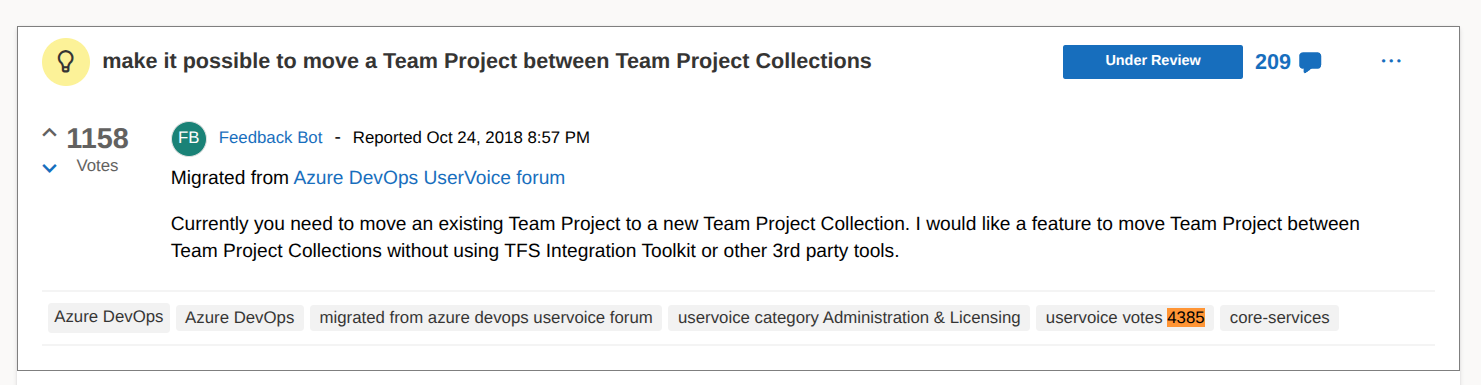
The request on Microsoft’s Developer Community, as displayed on 21 July 2026: 1,158 votes, 209 comments, status “Under Review”, and the “uservoice votes 4385” tag inherited from the old UserVoice forum.
But the request is in fact far older than that date. It was migrated from the old UserVoice forum of Azure DevOps, where it had already gathered 4,385 votes before ever landing on the Developer Community — a figure Microsoft preserved as a tag (uservoice votes 4385) on the request, visible as early as 2019 in an archive snapshot. And the problem itself is older still: the notion of a Team Project Collection comes from Team Foundation Server (TFS), the product Azure DevOps is built on. TFS has existed since 2005; it was renamed Visual Studio Team Services and then Azure DevOps (2018) on the cloud side, and Azure DevOps Server (2019) on-premises. In other words, the request has been formally on record for nearly eight years — and the blocker already existed years earlier, under TFS.
Microsoft’s official answer? Moving is architecturally difficult: in the design inherited from TFS, certain key identifiers — TFVC changeset numbers, work item IDs — are sequential and scoped to the collection, and referenced everywhere (source code, tasks, dashboards, queries, builds, tests…). Renumbering them when changing collection would break all those links. Microsoft concludes there is “no plan to deliver this feature” and points to partial workarounds (collection split, third-party migration tools) that never perform a complete, high-fidelity move.
The reasoning may be technically sound. But that is precisely the heart of the problem: a vendor’s design debt becomes its users’ prison. An architectural choice twenty years old — scoping identifiers to a collection — is today endured by every team that cannot make its projects match the reality of its organisation, and that has, once again, no hold to fix it itself. With a closed system, eight years of votes count for nothing against an architectural decision no one is allowed to touch.
The common thread: who really controls the software?#
Ten stories, one and the same mechanics. Each time, a decision — or a failure — by the vendor destroys the user’s investment, without them having any say:
- Access: broken compatibility, code to rewrite and retest entirely;
- Classic ASP / Web Forms: abandoned technology, with no painless alternative;
- Visual Studio: installer project type removed overnight, request #2 on UserVoice ignored for four years;
- Windows Server: licence price that explodes, on identical hardware;
- Windows 7 / 10: imposed end of support, machines thrown away, refusal to release the code;
- Windows Phone: two hardware breaks in two years, still-functional phones made obsolete by software alone;
- OneDrive: local sync broken, family organisation broken, no fix possible on our side;
- Balsamiq: product deprecated, forced migration, data imprisoned in a proprietary format;
- PC Soft: business model turned upside down, viability destroyed;
- Azure DevOps: projects impossible to move, eight years of votes ignored in the name of a design debt inherited from TFS.
This is exactly what Richard Stallman describes: with proprietary software, the developer has a power over users that no good intention is enough to make acceptable, because that power is structural. The user does not have the code. They cannot fix it, extend it, or entrust it to someone else. They can only endure — or start all over again.
Free software: regaining room to manoeuvre#
When you use a free (and therefore open source) project, you are no longer a prisoner. You have options that simply do not exist with proprietary software:
- Maintain the project yourself, since you have the source code and the right to modify it;
- Federate or join a community that maintains it;
- Benefit from others’ work: with a bit of luck, others fund and maintain the project, and all that remains is to contribute — financially, through mutual help among users, or through code.
A few illustrations, verified:
PHP rather than Access or Classic ASP. With hindsight, in the late 1990s, going with PHP would have been a better bet for longevity. I do not claim that PHP’s version upgrades were painless — they were sometimes painful — but they were possible, and no one could forbid you overnight from carrying on.
net2ftp, an FTP client written in PHP that I first encountered in the very early 2000s. Its last stable version (1.3) dates from July 2019, with no fundamental change of technology over all that time. A free tool can span two decades because no one decrees its death. (I could not publicly confirm the exact date of its very first version; I place it “in the early 2000s” from memory.)
Python 2 → Python 3, the most telling example. Python 3.0 comes out in December 2008, deliberately breaking compatibility. But because the ecosystem is free and community-driven, Python 2.7 was maintained in parallel until 1 January 2020 — more than eleven years. (The end-of-life date was even pushed back from 2015 to 2020 to give everyone time to migrate.) No one was faced with a fait accompli: everyone was able to migrate at their own pace. That is exactly what none of the ten previous stories allowed.
The difference is there: with free software, a break stays manageable, because the power of decision is not confiscated by a single actor.
And me, in all this? A path, not a posture#
I would not want to write all this from a pedestal: I am the first to be caught in these contradictions. What I am describing is a path, slow and sometimes fragile, not a virtue already attained.
What I have changed in recent years:
- Personally, I left Windows for Fedora Linux. One of my daughters switched to Fedora too.
- Professionally, I moved my whole team to TuxedoOS (a GNU/Linux distribution). I also tried to get Tuxedo computers adopted, which management refused. The shift remains fragile: in my group of about 60 people, only 5 of us are on GNU/Linux.
- I set myself a simple rule: for every euro spent on proprietary software, I offset it with a euro donated to a free project. Concretely, I contribute financially and every month to open-source projects — which doubles the real price of any proprietary software I buy directly (I don’t count embedded software, like the one in my car, whose cost I don’t know).
- In my own development work, I no longer use proprietary software: Prothesis Cloud is built almost exclusively on free and open-source software.
And then there is the contradiction I don’t want to hide: I am an employee of a company that develops and operates a proprietary SaaS, Prothesis Cloud. Some will tell me that, if I really believe what I write, I should resign. Beyond the fact that I need this job to support my family, I believe it is also useful to shift mindsets from the inside. Before, no one in the company knew free licences and their specifics; we developed only with proprietary tools. Today:
- we no longer learn closed technologies: when we hit a problem, we contribute on the forums (my Stack Overflow score has gone from 0 to 1,327 in recent years — modest, but better than zero);
- we have contributed to projects in the .NET ecosystem (for example an improvement merged into DocNet) and published the beginnings of a library as open source, SimpleExcelExporter (under the LGPL-3.0 licence);
- we run PostgreSQL in production: using a free project is already supporting its popularity — and therefore, indirectly, the investment that actors like AWS devote to it;
- the company has become a financial contributor to WeasyPrint, through the CourtBouillon collective on OpenCollective — which can be verified on its OpenCollective profile.
You sometimes hear that companies “exploit” free software. I believe the opposite: just by using it and making it known, you serve the cause — you broaden its user base, you report bugs, you help other developers, you fund the maintainers.
But if these ten stories teach one thing, it is that migrating to free software after the fact is slow, fragile and costly. Five people out of sixty, a management that refuses the hardware, years to undo accumulated dependencies. Hence the real lesson, especially for those just starting out: start free from the outset. Proprietary software often has good reasons to appeal — it is sometimes more polished, better integrated or better supported, and it can be a perfectly rational choice at the time. But, after all these years, my conviction is that it most often remains far easier to build on free software from day one than to extract yourself, years later, from a proprietary ecosystem you locked yourself into without even realising it.
Conclusion#
Proprietary software is, in the literal sense, depriving: it deprives the user of control over their own working tool. It is not a question of the vendors’ malice; it is a question of power structure. As long as you own neither the code nor the right to modify and redistribute it, it is the technology company that decides — on compatibility, price, licensing, the death date of your software — and you have no recourse.
I therefore invite everyone, everywhere, to turn to free software whenever possible, and to favour business models that respect customers and users rather than trapping them. And if you can, start free from the outset: extracting yourself from a proprietary ecosystem years later costs far more than never locking yourself into it. The following articles in this series will explore these alternatives concretely.
Sources and references#
- Richard Stallman & FSF — What is free software? (the four freedoms)
- Richard Stallman — Free Software Is Even More Important Now
- On the term “privateur” — Proprietary software, Wikipedia (FR)
- Converting from Access 2.0 — Allen Browne, “Issues in converting from Access 2” · Microsoft: importing Access 2.0 and 95 databases
- Homelidays Session Service — GitHub repository
- Visual Studio, removal then return of installer projects — Visual Studio Blog, “Visual Studio Installer Projects Extension” · InfoQ, “Visual Studio 2013 Installer Project” · InstallShield LE and Visual Studio 2012 — x64 support
- End of Windows 7 support and residual installed base — PC Gamer, “Over 100 million PCs still run Windows 7…”
- FSF campaign — “Upcycle Windows 7”
- Windows Phone, no upgrade from one generation to the next — TechCrunch: Windows Mobile 6.5 devices will not be upgraded to Windows Phone 7 · PCWorld: “Windows Phone 7 Users Can’t Upgrade to WP8” · Windows Phone 7, Wikipedia (EN) · Windows Phone 8, Wikipedia (EN)
- Smartphone software support duration — Macworld: “How long does Apple support iPhones?” · Google: update duration for Pixel phones · Engadget: Samsung commits to seven years for the Galaxy S24
- EU rules on smartphone updates and repairability — European Commission: new ecodesign rules (regulation (EU) 2023/1670), applicable since 20 June 2025
- End of Windows 10 support — Microsoft Support: Windows 10 support has ended on October 14, 2025
- PC Soft / WinDev, acquisition and new model — Next, “Les développeurs WinDev s’alarment…” · Programmez, “PC Soft: après le rachat…”
- Azure DevOps, project impossible to move between collections — Developer Community, “make it possible to move a Team Project between Team Project Collections” (opened on 24 October 2018) · 2019 archive snapshot showing the “uservoice votes 4385” tag · Microsoft Learn, “TFS is now Azure DevOps Server”
- OneDrive, shared folders turned into web shortcuts — Neowin, “Microsoft confirms OneDrive shared folders are indeed turning into internet shortcuts” · Windows Latest, “Microsoft confirms Windows 11 OneDrive internet shortcut bug”
- Balsamiq for Google Drive, shutdown and migration — Balsamiq, “Looking back at Balsamiq’s 2024” (the dedicated announcement page is no longer online)
- net2ftp — Wikipedia (EN)
- End of life of Python 2 — Python.org, “Sunsetting Python 2” · PEP 373 — Python 2.7 Release Schedule
- My contributions cited — DocNet, PR #42 (merging multiple PDFs) · SimpleExcelExporter (NuGet, LGPL-3.0) · WeasyPrint / CourtBouillon on OpenCollective · OpenCollective profile of Prothesis Dental Solutions
